
.avif)
Business-grade AI image generation is now live in Blueflame AI.
Powered by Google’s Gemini 3 Pro Image in the U.S. and Gemini 2.5 Nano in the E.U., @ImageGeneration enables you to create high-quality, professional visuals that are suitable in regulated, client-facing environments—where brand consistency, compliance, and clarity matter. This includes:
- IC and board-level diagrams — visuals ready for investment committee presentations
- Infographics and explainers — distill complex concepts into clear, shareable formats
- Clean visuals with readable text — no garbled labels or illegible captions
- Correct use of logos and brand elements — maintain consistency with your firm's visual identity
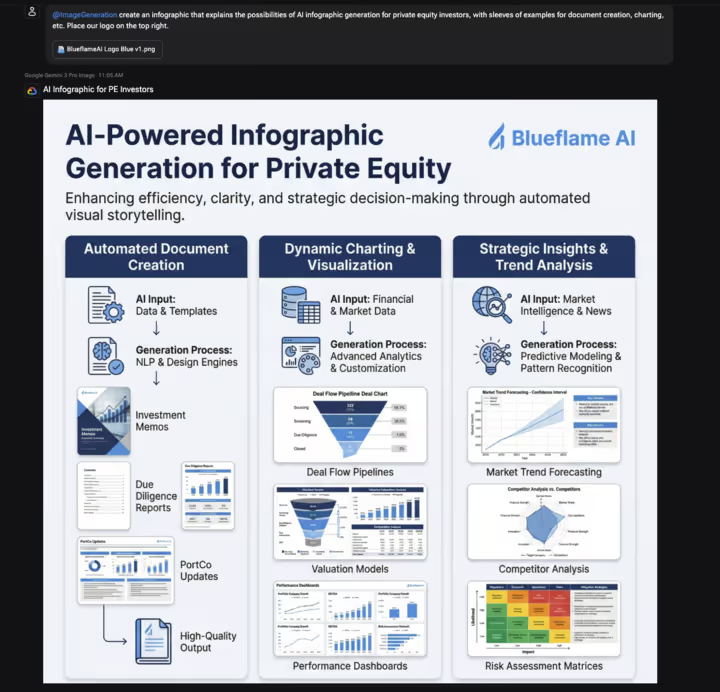
To get a bit meta, here’s an image I generated to illustrate the types of images private equity investors can create with AI:
How it works
Blueflame AI’s @ImageGeneration tool can transform complex information, data, and key insights into various types of visuals, including:
- Market maps for competitive landscape and sector positioning
- One-page summaries for executive-ready overviews
- Pie charts and line charts for data visualization for trends and allocations
- Technical architecture diagrams for system and infrastructure illustrations
- Workflow and process diagrams for step-by-step operational flows
- Infographics for multi-element visual storytelling
Additional features:
- Maintain brand consistency: Upload your firm's logo, specify brand guidelines, and add up to six reference images to ensure every visual aligns with your firm's identity and tone.
- Refine without starting over: Edit and iterate within the context of your original prompt using multi-turn editing—no need to rebuild from scratch.
- Download images: Save visuals and insert them into IC memos and client deliverables.
Use cases
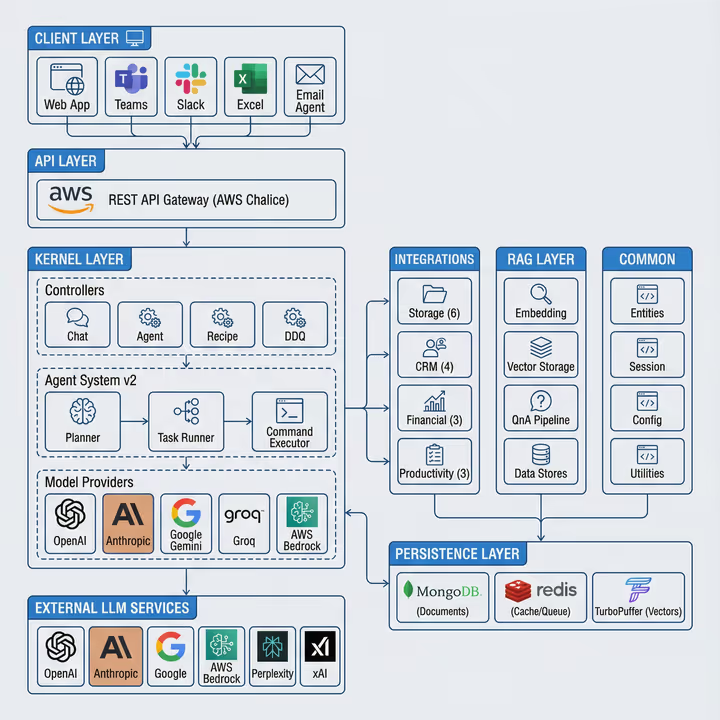
I’ve been using Blueflame AI’s image generation feature to turn raw architecture notes and technical text into slides that I’d actually send to an IC. Below are example prompts and the resulting images.
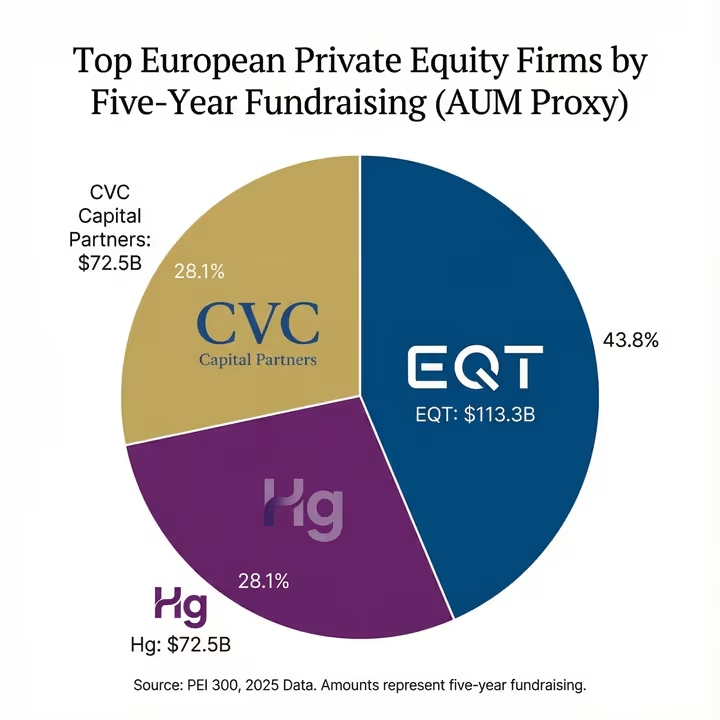
Pie charts
Sample prompt:
@ImageGeneration create a pie chart by AUM with each firm’s logo attached to their AUM
Infographics
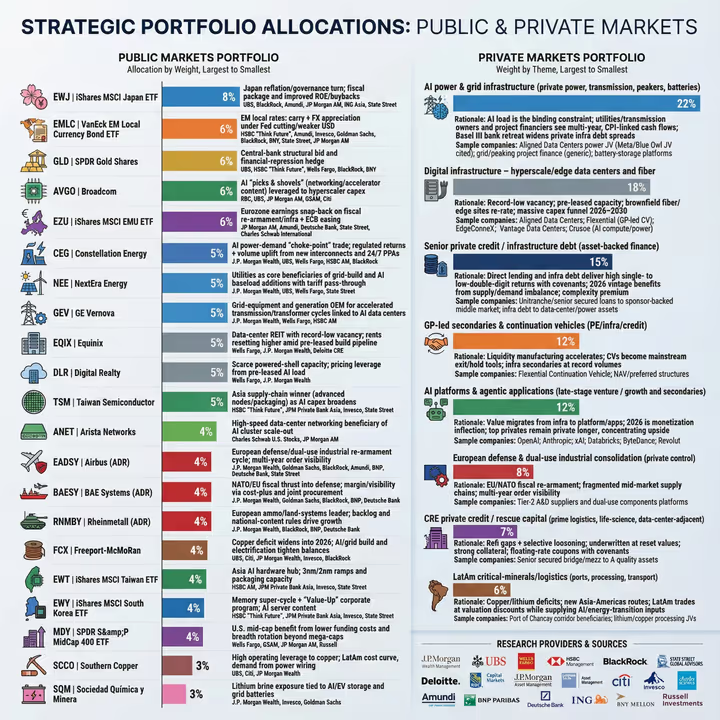
Sample prompt:
@ImageGeneration plot out the themes and portfolio recommendations above [context above pulled from research reports] into a two panel infographic, one side with a public portfolio recommendation with sorted weights by ticker and the other with key private investing themes
Line charts
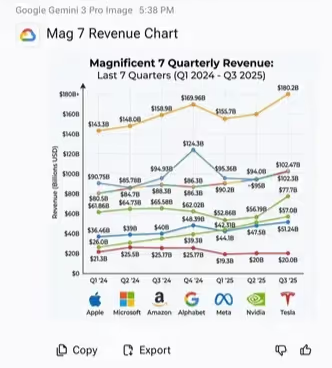
Sample prompt:
@ImageGeneration generate a line chart using the quarterly revenue data found previously on the magnificent 7
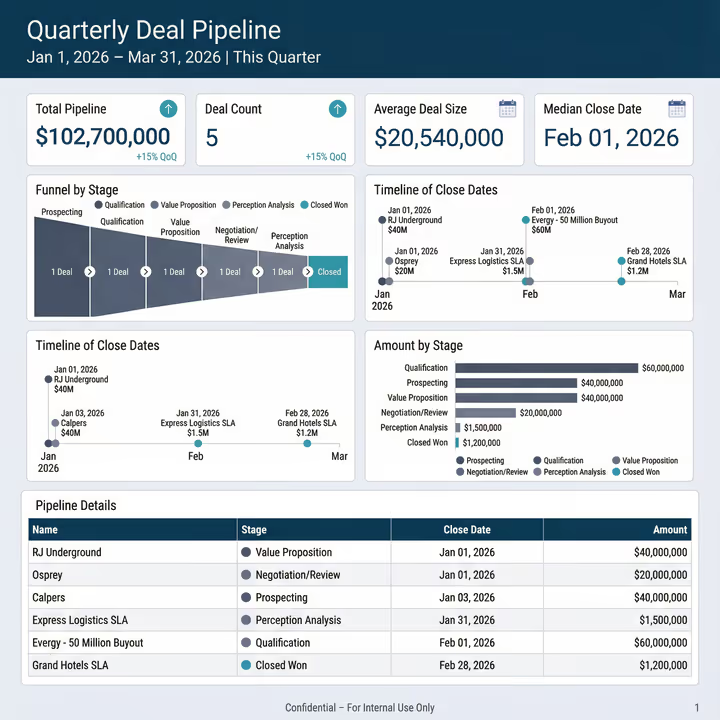
One-page visual summaries
Sample prompt:
@ImageGeneration create a one page visual summary based on this Blueprint output
Technical architecture diagrams
Sample prompt:
@ImageGeneration create a full-stack tech architecture diagram on our code structure using the tech documentation provided
Getting started with image generation
For best practices on how to create AI images with Blueflame AI, check out our user guide in the help center (tip: ensure you’re logged into the Blueflame AI portal and that popups are enabled in your browser).
Frequently asked questions
What AI models power Blueflame AI's image generation feature?
Blueflame AI's image generation feature is powered by Gemini 3 for users in the United States and Gemini 2.5 Nano for users in the European Union.
What types of visuals can I create with Blueflame AI's image generation tool?
The @ImageGeneration tool can create a wide range of professional visuals, including market maps, one-page summaries, pie charts, line charts, technical architecture diagrams, workflow and process diagrams, word clouds, and infographics. These outputs are designed for investment committee presentations, board meetings, and client-facing materials.
Can I customize generated images to match my firm's brand guidelines?
Yes. Blueflame AI allows you to upload your firm's logo, specify brand guidelines (such as colors, fonts, and tone), and upload up to six reference images to guide the output. This ensures that generated visuals align with your firm's visual identity and meet professional standards.
Does Blueflame AI support iterative editing of generated images?
Yes. The image generation feature supports multi-turn editing, which means you can refine details, adjust layouts, or modify elements within the context of your original prompt—without needing to start from scratch each time. This streamlines the creative process and reduces time spent on revisions.
Is Blueflame AI's image generation feature suitable for regulated industries like private equity and asset management?
Yes. The feature is specifically designed for regulated, client-facing environments where brand accuracy, compliance, and clarity are critical. Investment professionals use it to create IC and board-level diagrams, infographics, and data visualizations that meet the presentation standards expected in private equity, hedge funds, and institutional asset management.
Ready to transform your data into boardroom-ready visuals?
Stop spending hours manually building diagrams and charts. With Blueflame AI's image generation feature, you can turn complex data, research insights, and technical notes into professional visuals in seconds—all while maintaining your firm's brand standards.
Request a demo to see how Blueflame AI can streamline your workflow and elevate your presentations.