
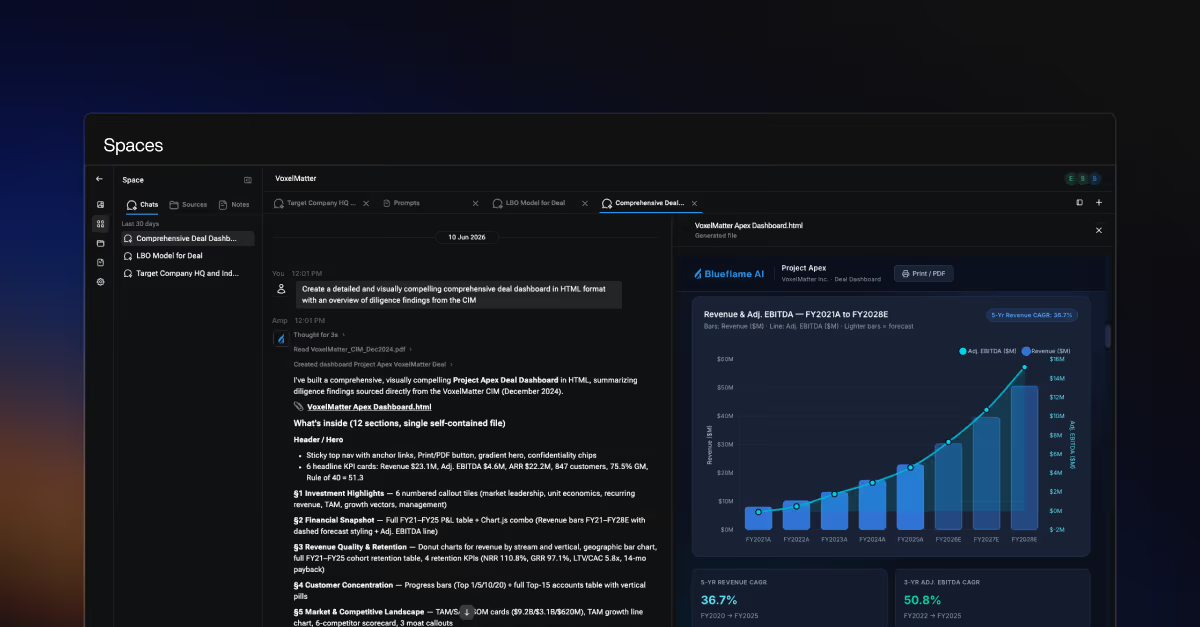
Most meaningful work doesn't happen in a single conversation or working session. It accumulates across files, notes, drafts, and the back-and-forth between teammates.
Generic AI chat tools weren't designed for that. Each new session starts from zero, so the team ends up re-uploading the same materials, re-explaining the same context, and getting answers that miss the specifics of what the team is working on.
Blueflame AI’s Spaces take a different approach. Each Space is a dedicated home for a single project, deal, or initiative, where relevant files, notes, and connected sources all live in one place.
Blueflame AI’s agent works on top of that context, so outputs stay grounded in the real work – and as more gets added, the Space's knowledge compounds instead of starting over with every new session.
How Spaces work: connecting materials, context, and collaborators
Every Space is built around the work relevant to a project or deal, with privacy and governance controls that keep the right information with the right people at the right time. The team shares one view of the project, and each contributor picks up where their collaborators left off.
- One place for files, notes, and work related to the project: connected sources like Datasite data rooms, SharePoint, and Box live alongside manual uploads and team notes.
- Outputs grounded in the Space’s context: every query draws on the files, notes, and prior chats inside the Space, so answers and deliverables reflect the specifics of the work and the team doesn’t have to re-prompt or re-explain to get there.
- Built for both individual and team-based work: chats with Blueflame’s AI agent are private by default, giving each contributor a place to draft, test, and refine independently before sharing their work with other members of the Space.
- Multi-pane view made for productivity: files, chat threads, and notes can be viewed side-by-side – so you can shift focus from one to the other without losing your place in any of them.
- Access that stays secure: users need access to the Space and the right permissions in a connected source to see a file, so collaboration never comes at the cost of the controls your firm already relies on.
How teams are using Spaces to accelerate collaborative work
Spaces are flexible, giving teams the tools to organize work and collaborate around any project, deal, company, or initiative. Common use cases include:
- Market research tracking: aggregate expert transcripts, broker reports, and internal analysis in one place, track themes and identify trends over time, and build a durable knowledge base each new project can draw on.
- Buyer interaction tracking: track every buyer touchpoint from a single place by consolidating deal context, internal notes, buyer trackers, materials received, and publicly available buyer intelligence – so bankers always have a complete, up-to-date picture of where each buyer stands.
- LP fundraising and relationship management: pull together meeting notes, fund performance materials, and market context ahead of LP conversations, and keep IR teams, deal teams, and leadership teams aligned on touchpoints and follow-ups.
- Q&A response drafting: review and finalize accurate Q&A responses, with Blueflame automating the first draft by querying the live Datasite data room and your firm’s proprietary analysis and data – saving hours of manual document drafting.
Frequently asked questions
What are Blueflame AI’s Spaces?
Each Space serves as a dedicated home for bringing together the files, notes, and work around a project, deal, company, or initiative so investors and deal teams can collaborate across multiple sessions without losing context.
Which systems can I connect to a Space?
Spaces can connect to the same data sources as enabled for your Blueflame account, including Datasite data rooms, SharePoint, and Box. All connected materials respect the permissions defined in their source systems.
What workflows are Spaces best suited for?
Spaces are designed to enhance collaboration for multi-person, multi-session workstreams that depend on shared context, including deal diligence, market and competitor research, contract and NDA review, LP fundraising and IR, and Q&A response drafting against live Datasite VDRs.
How is a Space different from a shared drive?
A shared drive is a place to store files. A Space holds the work that happens on top of those files – the live connected sources, notes, prior queries, and activity that are essential to your work – and bases every answer and output on that context. The result is a deeper, more accurate view of the project, deal, company, or initiative for the agent to draw from.
Bring your materials, your team, and your AI into one workspace
Get started with Spaces to give each project, deal, or initiative its own home – unifying complex workstreams, team collaboration, and agentic AI to keep your deals moving forward.
👉 Existing customer?
Spaces are available now in Blueflame AI. Check out our user guide in the Help Center (make sure pop-ups are allowed for Blueflame) to get started.
👉 New to Blueflame AI?
Request a demo to see how Spaces can help your team collaborate on deals, research, and other complex projects.